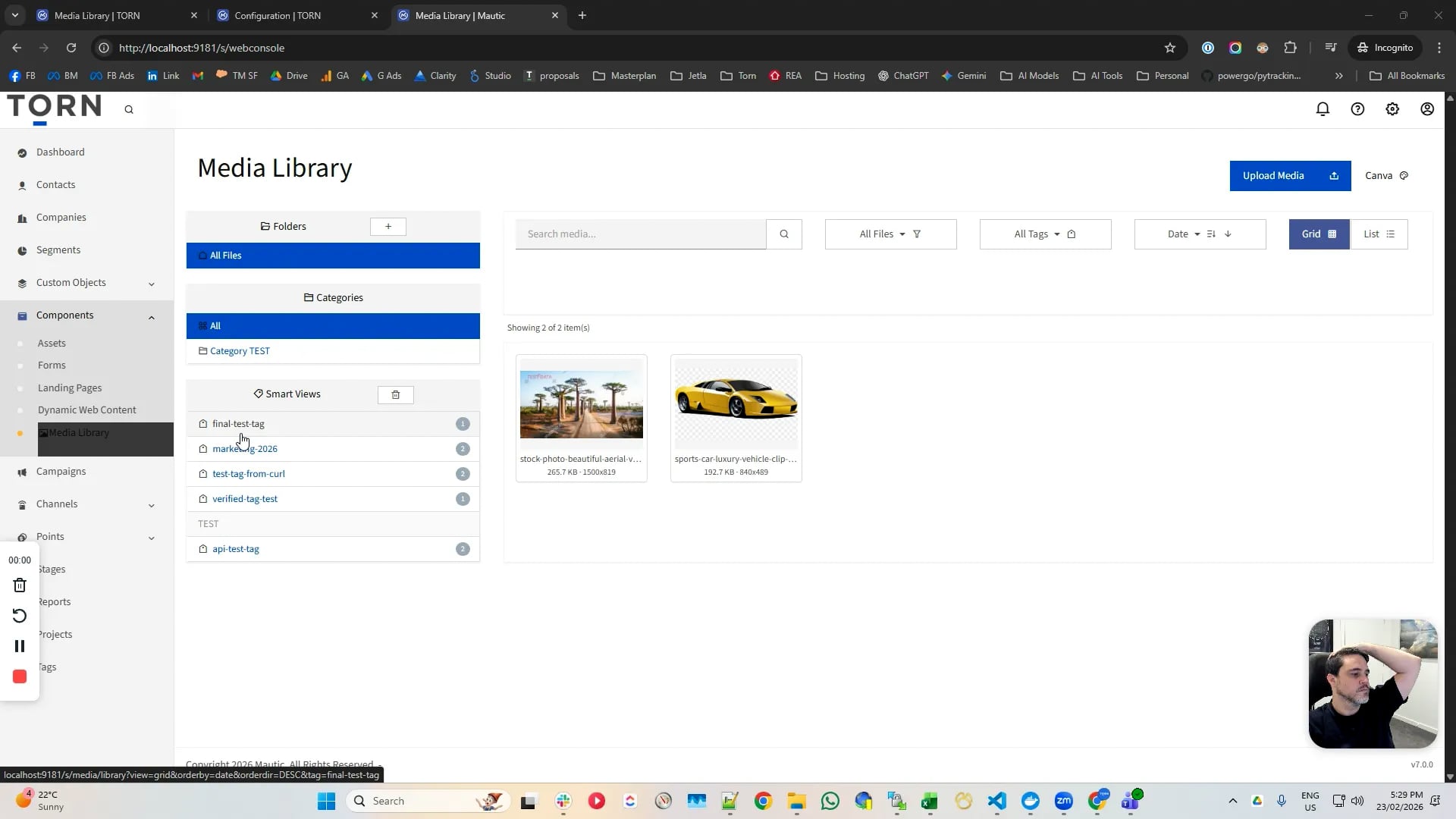
My biggest pain for Mautic is that it is not marketing coordinator friendly - been a complaint for many years - so in the effort to bring mautic up to scratch with all other email platforms I am chipping away feature by feature with new plugins for my own purpose.
Some I will release to the community
Dedicated in app Media Library
Media Tagging system
Bulk actions (tag/delete)
Dynamic folders and static folders
Media editor with Filerobot Image Editor (MIT, open-source).
Automated image resizer and formatter
GrapesJS modal (Replicating similar Media Library experience)
GrapesJS image selector (image variant size)
Highlevel config controls (max image size/formats/default size for emails)
Mautic Media Manager - TORN - 22/02/2026, 6:23:06 pm
I saw the new Torn Media Manager plugin and had a quick question: does it support using an S3-compatible backend for asset storage, or does it only work with files stored locally on the Mautic server?
havent given it any thought as yet - as it was to work natively with the existing file system so not to upset any core logic.
That said there is an Amazon S3 plugin and thus I am sure we could play with it a bit in context - I personally use Cloudflare R2 for everything and havent played with S3 in mautic as a result.
1 complication does come to mind would be the file editing - S3 would need a local edit then file upload/replace approach as S3 you can not edit files once uploaded.
Yes, I was already aware of the Amazon S3 documentation you kindly linked in your post.
For now, storing assets locally works fine, but my long-term plan is to offload them to S3, as moving assets there would significantly reduce the storage and performance load on a Mautic server when you run at scale.
It could be very useful in the future if your plugin were able to detect where an asset is stored (for example, locally or on S3). Ideally, an existing asset could remain in S3 while a new copy is being edited or modified locally. Once the changes are complete, the updated version could then be moved back to S3 automatically.
It’s something that might be worth considering for future development.
@tornmarketing This looks incredible, I was contemplating building something much less advanced just to get over the hump, very much look forward to seeing this come to life.
Hello @tornmarketing, this project is very interesting and directly addresses a pain point we regularly encounter as a Mautic agency and hosting provider.
I recently opened the “Global Media Library accessible from main navigation” discussion because many of our users struggle to manage and reuse media assets in Mautic 6, especially when working with custom HTML templates rather than exclusively through GrapesJS.
We currently operate multiple Mautic instances and would be happy to test the new Media Manager in real-world environments, provide UX feedback, identify migration concerns, and report bugs.
If you’re looking for additional testers, I’d be interested in getting access to the private repository and contributing feedback during development.