Email is THE number one important feature in Mautic, yet not the best or most beloved one.
Status quo:
Most users find the current builder very limited (same even say ugly words about it ; )
Some larger organizations swap it out and user other builders
Some frustrated users prefer to build externally & just paste the source code into Mautic.
This has to change.
General options:
get rid of GrapesJS altogether
keep GrapesJS but swap out ckeditor
stick with GrapesJS and ckeditor but make it much better.
My personal preference would be #3 because I feel that yet another change of horses would create even more frustration, and not necessarily trust in whatever comes next.
I also believe that ckeditor is not the root cause for most issues even if it seems to be. Also I am not convinced that another editor (especially a free one) can give us the same value. In the end: There were good reasons behind making that choice.
Therefore, we are currently testing the waters for “3. stick with GrapesJS and ckeditor but make it much better”.
And to do that, I’d appreciate all the input we can get. Items we identified or received so far (intentionally unsorted):
Inheritance: Content from GrapesJS blocks has to use the theme’s styling, currently it frequently doesn’t
Copy & Paste between email instances (solved, I believe)
“Save email as theme” feature
If i click outside of the ckeditor modal window, that discards my changes (solved, I believe)
Confusion between per-character font styling (ckeditor) and per-element font styling (GrapsJS) → Idea: Prevent per-element font styling for ckeditor elements
Fully support dynamic content (incl. tokens), also for emails
Fully support tokens incl. forms
Sort token list
Search in tokens
Support MJML emails through API
Simple vs. expert mode
“Table” element for MJML, and for HTML / Landing Pages
Control ckeditor font choices from Theme
Allow changing of link color
Paragraphs are added by editor after saving email (issues with headlines, also: creates isolated elements even for empty lines, impossible to maintain afterwards)
GrapesJs is still moving inline CSS to style tags #11934
Code Editor in Landing Pages Duplicates Content into the Section #14409 (PR exists: fix(code-editor): prevent head duplication, remove empty < p >, confirm before discard (fixes #14409) #15398
When I have a draft in some email, an create a fresh one, I am suggested to restore from that draft
Inline ckeditor instead of modal window
link property “disable link tracking” in ckeditor
Dynamic Content - Copying Dynamic Content is not working (as intended) #15214
Dynamic Content - Elements always come with default padding thats not removable in the builder #15209
Dynamic Content - Deletion of filters is broken #15205
Avoid “stuff” from copy&paste e.g. from Word (format-free paste, or even whitelist-based paste)
Documented way to strip down the ckeditor options in a Mautic instance (remove icons that are undesired)
verify healthiness and future of GrapesJS builder Open Source project
allow adding GrapesJS blocks through themes PR #13002
do not require doubleclick to invoke creditor → not doing this, it is intentional tradeoff behavior of GrapesJS
Please help us out by adding your observations (bugs, UI flaws, bad code results, missing features, existing solutions, …) here!
Ruth has already explained that once the marketplace is released, new 3rd party builders developed by the community will become available. Although that’s not the ideal solution, some of my clients rely heavily on GrapeJS, even though they share the same concerns has you mentioned.
Avoid “stuff” from copy&paste e.g. from Word (format-free paste, or even whitelist-based paste)
This is extremely important to address and remains a common issue we all face!
I believe that replacing the builder entirely is something that will need to be considered in the future, as the current one often discourages new users due to its learning curve.
There is one more point I would add to your suggestion, something I find very useful:
Giving email/landing page themes the ability to include pre-made blocks. When users drag and drop the standard elements, such as buttons, they don’t have the same visual style of the theme.
Oh and I recently saw a powerful feature in another marketing automation platform:
Generate a template with AI.
What kind of email do you want to send [ input field]
This then generates a template based on a pre-existing set of templates but tailored to your description.
If you look in the Ideas section, you’ll see that I’ve already proposed several ways to improve the Mautic email builder, but unfortunately they haven’t gained much traction — which is a shame.
Here is my revised idea:
For those running Mautic at scale on servers that are already heavily loaded, creating and building emails directly inside Mautic can be painfully slow. Anyone who has tried to use the email builder on a busy server knows how frustrating the experience can be.
So why not take the email builder out of Mautic entirely and turn it into a standalone tool?
A standalone email-building application could evolve at its own pace, independently of the Mautic core. It would allow users to create, open, and store email designs as separate files, and once a design is finished, it could be imported back into Mautic using a simple import feature.
GrapesJS would be an excellent foundation for such a standalone builder. It’s proven, flexible, and already widely used for email and page design. By building the standalone builder on top of GrapesJS:
Mautic would no longer need to maintain a heavy, integrated builder
Designers would have a fast, dedicated environment that isn’t affected by server performance
The builder could evolve more quickly and remain fully decoupled from Mautic’s release cycle
Additional advantages:
Teams of designers could work without putting any extra load on production Mautic servers.
No need to maintain a separate Mautic instance purely for design work.
The standalone builder could be lightweight and optimised specifically for design.
Existing MJML workflows or third-party tools could be integrated instead of reinventing the wheel.
Templates would become file-based, making them easy to import into any Mautic instance.
This could even support a marketplace where designers sell templates to the community.
Another important point: Mautic needs the ability to disable or soften the email code sanitiser.
Right now it is far too restrictive and often strips out essential code required for modern, responsive layouts. If users are importing trusted templates from a standalone builder, they should be able to bypass the sanitiser entirely or control it selectively.
This is similar to my current workflow — I hand-code templates and can produce them quickly — but a proper standalone builder would make this possible for everyone.
I may still build my own tool eventually independent of any standalone GrapesJS tool (likely in C or C++ which is ideally suited to code creation), but it would be fantastic if Mautic provided a clean, simple import mechanism rather than what we currently have in M6.
Thanks @woutersf !
I’ll take the AI-related ideas to the AI initiative (namely Lukas who is leading the effort) who obviously have such things on their list, and coordinate where to best push this forward. (I saw you already contributed big time in Slack #wg-ai)
About
importing content from remote sources (like the popular questions about the RSS plugin)
→ Sounds great! Would you care to elaborate on this idea? I could image online sources like RSS, maybe manual “uploads”,… but we should start by figuring out what the most valuable things would be for users, imho. (NOT looking at Mautic implementation or UI at this point)
see above: “allow adding GrapesJS blocks through themes”
“allow adding GrapesJS blocks through plugins” → We already have that
“When users drag and drop the standard elements, such as buttons, they don’t have the same visual style of the theme.” → That should be covered by “Inheritance: Content from GrapesJS blocks has to use the theme’s styling, currently it frequently doesn’t”
@ekke exactly yes, that would be the ideal scenario: for the builder to inherit the template elements so that whenever a user adds a new block, it automatically comes with the proper styling. The challenge is that some templates include multiple button styles, text variations, etc.., and I don’t see an easy solution for handling that.
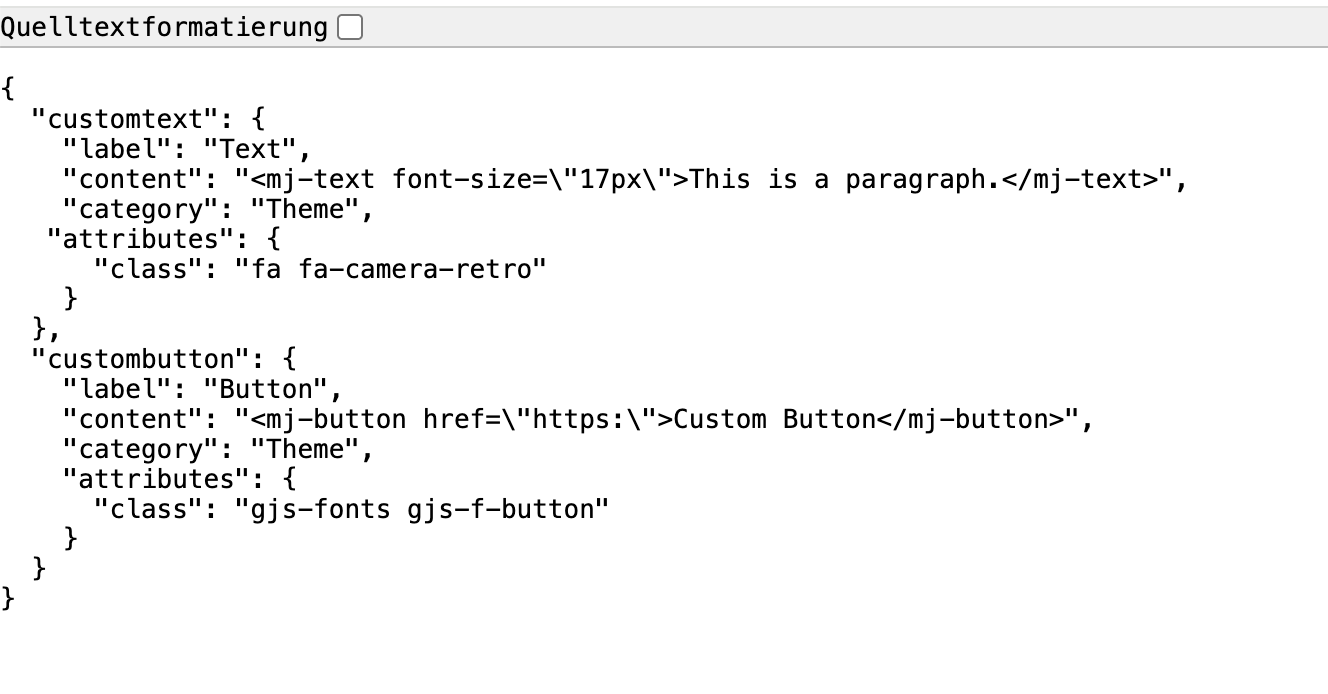
What we have done so far, and we can already share the code as shown, is create a blocks.json file inside the email template. In that file, we include the block details - label, code, icon - we want to appear in the builder.
Good artists copy, great artists steal. – Steve Jobs
In this case, steal the email editor technology the Monkey uses. If you can emulate that, you have a familiar system for new Mautic users to be automatically accustomed to. Also, you won’t have to worry about 3rd-party updates to a crucial part of the system. While you are doing this, please also add AI capabilities with API connections to the standard popular LLM options.
It would be wild if you could enable email templates and generative image creation.
Here’s one topic for discussion: The and icons in the builder seem to be pretty unclear for everybody.
What they really do is:
- saves the content and brings it live immediately. Remains in the Builder.
: - exits the builder, does not discard the content but also does not bring it live. Only hitting Save or Save & Close after quitting the Builder will bring it live.
Right?
To me, this is two issues:
Or those the actions that users really need for their workflows? If not: What are the ones needed?
Whatever the resulting actions are: How can we best make them explicit? Get away from the guesswork?
(Good to keep in mind that all this comes from Mautic, not GrapesJS, so we are pretty free)
Current thinking:
use Text buttons, not icons
Suggested actions & labels: Save / Close / Cancel
Save / Close would remain the same actions as before, to avoid breaking the existing behavior.
Cancel would discard.
Wording would be aligned with the Mautic standards
However, using Save now instead of Save might be a stronger hint that this button brings stuff live immediately (and Save / Cancel after quitting the Builder are meaningless)
If you really want to move forward with a builder update, here are a few suggestions that I believe would add a lot of value:
Edit history: allowing users to move back and forth between changes made by the team would greatly improve confidence when editing.
Cache / auto-save: if the user accidentally closes the page or loses the session, changes should be preserved. This is quite close to what you already described.
UX/UI improvement for saving: switching the check icon to a floppy disk icon would better communicate the save action. I have been asked many times where users can save their work in the builder.
Fullscreen icon: the current icon does not clearly represent a maximise window. Using a standard maximise icon would be more intuitive.
Saved blocks/components: as discussed previously, the ability to save reusable blocks such as buttons, layouts (H1 + text + CTA), and similar components would save a lot of time and significantly optimise the email design workflow for users!
One additional question: are there any newer versions of GrapesJS that could be worth evaluating in this context?
dear all,
finally, here’s a PR ready for testing - it makes our GrapesJS builder much more convenient to use! Please test and give feedback
(Currently Mautic 7 only. But Backport to M5 is on the way.)
ideally in conjunction with
It covers these topics:
Rich text editor (ckeditor) is now inline , not modal
Theme driven font configuration via config.json with proper fallback chain (Verification: Define fonts in theme config.json, reload builder and confirm fonts appear; remove them and confirm fallback to config/local.php or CKEditor default)
Headings and paragraph styles configurable via theme JSON including class variants (Verification: Add custom heading and paragraph entries in config.json and confirm they appear and apply correct classes in editor output)
Support for multiple heading variants such as Heading 2 Red and Heading 2 Blue (Verification: Define multiple h2 variants with different classes and confirm dropdown shows all and applies correct class in HTML)
Typography panel hidden (siehe unten!) for editable text elements to prevent conflicting styling (Verification: Select editable text block and confirm Typography panel is not visible in block properties)
Typography removed from enclosing landing page sections where it had no effect (Verification: Select section or container block in landing page and confirm Typography is not available)
Default font logic clarified and made deterministic (Verification: Set first font in theme JSON and confirm it is preselected as default in dropdown)
Optional support for custom font size entry (Verification: Enter a custom numeric size and confirm it applies correctly to selected text)
Paste from Office cleaning confirmed and preserved (Verification: Paste formatted content from Word and confirm unwanted styles are stripped)
Open in new tab set as default behavior for links (Verification: Insert link and confirm target is preconfigured to open in new tab)
Insert Token dropdown improved, and added hint with { (Verification: Type { and confirm variable modal appears; test dropdown layout visually)
Safari token dropdown positioning issue resolved (Verification: Open builder in Safari, open Insert Token and confirm dropdown is correctly positioned and scrollable)
Indent functionality working consistently for regular text and lists (Verification: Apply indent to paragraph and list items and confirm expected spacing behavior)
Full styling support for ordered and unordered list markers including font, color and size (Verification: Change font, color and size of list and confirm marker reflects same styling)
Marker styling made MJML compatible for email rendering (Verification: In email builder, style list and confirm preview renders correctly and builder closes without MJML errors)
List behavior unified between email and landing page builders (Verification: Create styled list in both builders and confirm consistent editing and saving behavior)
Removal of extra <p>: Content now saved and reloaded in JSON format for consistency (Verification: Edit content, reload page and confirm formatting and structure remain intact)
Some this are currently still out of scope, e.g.
Proper “unsaved changes” handling
New blocks
Themes applied to block drag&drop (“Inheritance”) - different story
inheritance - different story
GrapesJS upgrade
Heads-up: If you test with an existing theme that specifies something like “centered” at a certain point, you end up again in the conflict “CKEditor vs. GrapesJS block” => You could change it to left-aligned in CKEditor, but afterward the block overrides it again. To prevent this in the future, we have currently removed “Typography” entirely from the block - however, this also means that existing settings for older themes can no longer be modified. We aim to come up with a migration script soon.
For testing the theme-controlled editor fonts, add this to your themes:
Thank you so much Team Leuchtfeuer for giving some much needed love to the native Mautic editor and for living the open source spirit (instead of building your own separate solution for the editor, like unfortunately so many others).


 )
)
 uses. If you can emulate that, you have a familiar system for new Mautic users to be automatically accustomed to. Also, you won’t have to worry about 3rd-party updates to a crucial part of the system. While you are doing this, please also add AI capabilities with API connections to the standard popular LLM options.
 and
and  icons in the builder seem to be pretty unclear for everybody.